---
title: "Introduction to Mapster in C#: Benefits and Quick Start Guide — Ivan Kahl"
description: "Mapster is a high-performance object mapping library for .NET. A beginner-friendly introduction highlights the key features behind efficient data mapping in C#."
url: https://ivankahl.com/blog/introduction-to-mapster-in-csharp/
published: 2024-06-03T00:00:00.000Z
tags:
- "Guides"
- ".NET"
- "Tutorials"
---
03 Jun 2024 · 7 min read
# Introduction to Mapster in C#: Benefits and Quick Start Guide
Mapster is a high-performance object mapping library for .NET. A beginner-friendly introduction highlights the key features behind efficient data mapping in C#.
Object mapping is critical in several software design patterns. Whether using [Ports and Adapters](https://alistair.cockburn.us/hexagonal-architecture/), [Clean Architecture](https://blog.cleancoder.com/uncle-bob/2012/08/13/the-clean-architecture.html) or [N-tier Architecture](https://stackify.com/n-tier-architecture/), you’re bound to encounter object mapping. This process involves copying data between different types of objects, typically between layers in your application. The diagram below demonstrates how you might use a mapper to map between DTO objects in your Web API project and domain objects in your Core project.
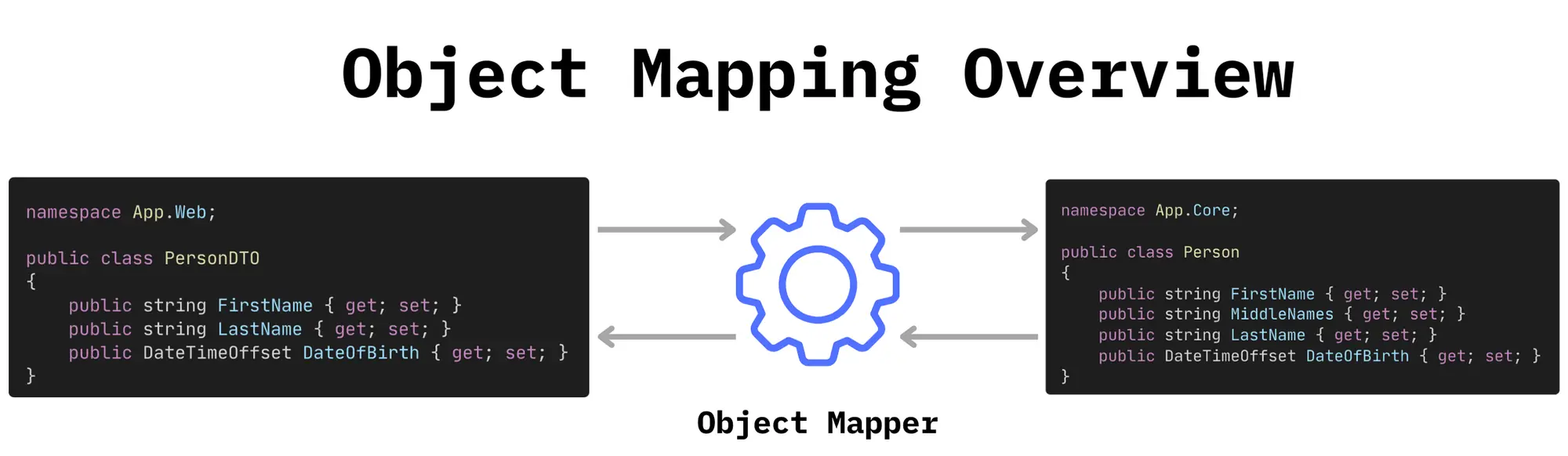
*Diagram illustrating how to map between a PersonDTO and Person class in C# using an Object Mapper.*
Several object mapping libraries exist in .NET, one of the most popular being [AutoMapper](https://docs.automapper.org/en/stable/). Recently, [Mapster](https://github.com/MapsterMapper/Mapster) has emerged as a high-performance, flexible alternative to traditional options like AutoMapper.
In this article, you’ll learn more about Mapster and its benefits over traditional object mapping libraries in C#. You’ll then see some practical examples demonstrating how quick and easy it is to use Mapster in your project.
## What is Mapster?
Mapster is a versatile object mapping library designed for .NET and is known for its high performance and flexibility. The package offers an efficient alternative to traditional mapping packages. This efficiency is possible because Mapster creates mappings at compile-time using code generation instead of at runtime using reflection, like AutoMapper. The compiled code can map objects faster and more efficiently, reducing memory overhead.
## Benefits of Using Mapster
As mentioned briefly above, Mapster comes with several benefits:
- **Performance**
Mapster’s compile-time code generation is significantly faster than traditional reflection-based methods. Mapster does all the heavy lifting of figuring out how to map between objects at compile time and creates a mapping class. This mapping class is significantly faster when mapping objects at runtime than reflection-based mapping.
- **Flexibility**
Mapster offers a Fluent API to create custom mappings for objects with complex mapping requirements. The API provides custom member mapping, conditional mapping, mapping to non-public members and more. However, you’re not forced to use this API. If your models are straightforward, you can let Mapster automatically figure out how to map between source and destination objects.
- **Simplicity**
As mentioned in the previous point, just because Mapster offers a flexible Fluent API doesn’t mean you must use it. You can get up and running with minimal configuration, and the package is easy to integrate into an existing project with minimal code changes.
- **Lightweight**
Because Mapster avoids using reflection for mapping, it has a light memory footprint. This makes it ideal for applications that map large volumes of objects or have strict memory requirements.
## Getting Started with Mapster
You’ll now learn how to install Mapster in a C# project and configure basic mappings between objects.
### Prerequisites
To follow along with the examples below, make sure you have the latest .NET SDK installed. At the time of writing, this is [.NET 8](https://dotnet.microsoft.com/en-us/download/dotnet/8.0). Ensure you download and install the SDK, not the runtimes.
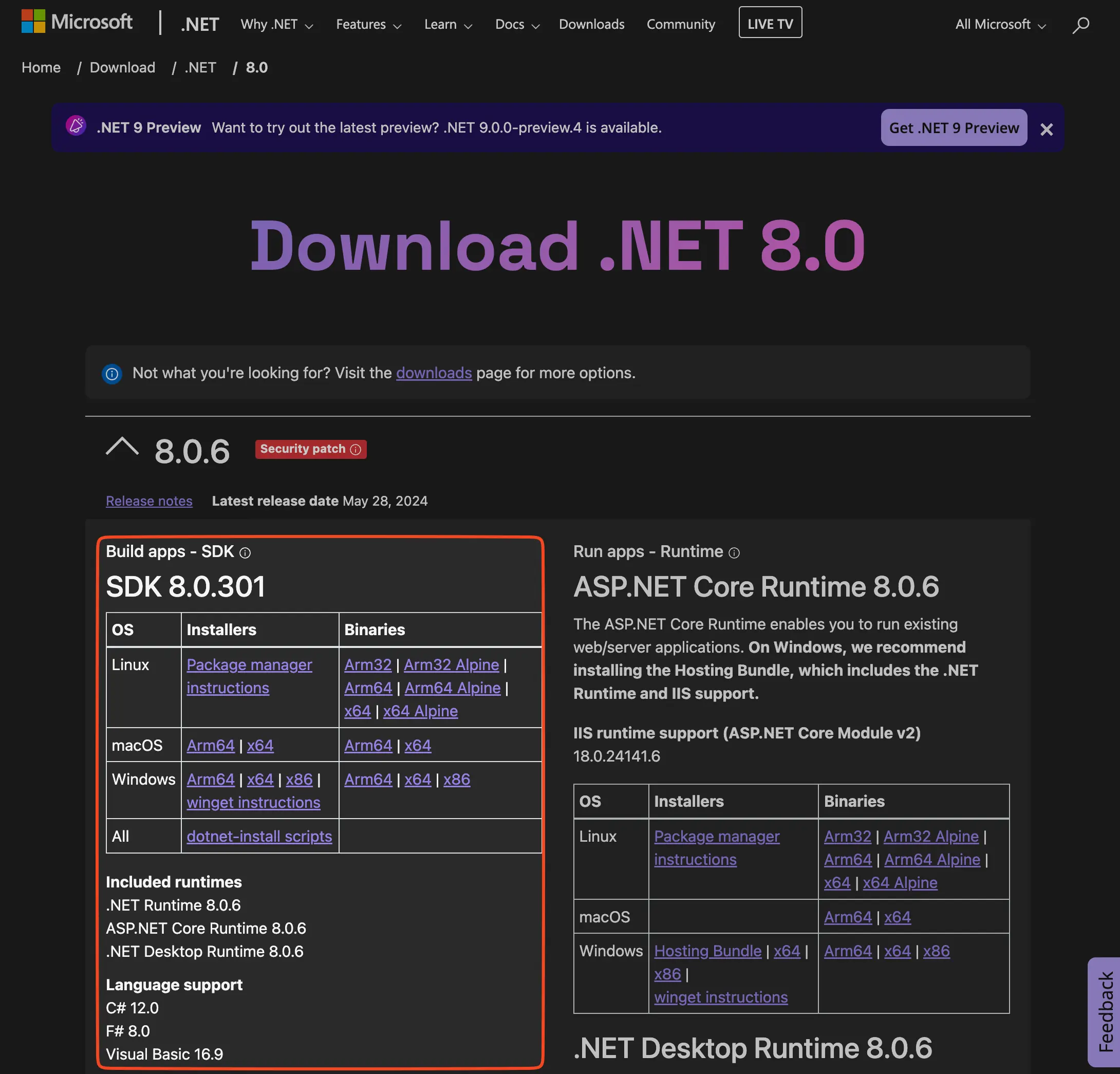
*Make sure you download the SDK, not the runtimes.*
You’ll also need a code editor or IDE that supports C#. [Visual Studio Code](https://code.visualstudio.com/) with the [C# Dev Kit extension](https://marketplace.visualstudio.com/items?itemName=ms-dotnettools.csdevkit) is a good solution.
### Create a C# Console Project
For this article, you must create a new C# Console project. This is the most straightforward, runnable C# project you can make.
Open a new terminal window and run the following command to create the project:
```shell
dotnet new console -o MapsterDemo
```
Navigate into the new directory and open it in Visual Studio Code using the following commands:
```shell
cd MapsterDemo
code .
```
### Install Mapster
You’ll find the Mapster package on [NuGet](https://www.nuget.org/packages/Mapster/). Install the latest version of the package, which at the time of writing is 7.4.0, using the following command:
```shell
dotnet add package Mapster
```
The command uses the .NET CLI installed with the SDK to add the package to the console project.
### Create Classes to Map
First, you’ll create two classes between which you want to map data. This is common in layered architecture as it lets you transfer data between layers without exposing underlying business logic or domain models.
First, create a new file called `Person.cs` and paste the following code for a `Person` class.
```csharp title="Person.cs"
namespace MapsterDemo;
///
/// The model object represents a person in your core application logic.
///
public class Person
{
public int Id { get; set; }
public string FirstName { get; set; }
public string LastName { get; set; }
public string SocialSecurityNumber { get; set; }
}
```
This is your domain model, which sits at the heart of your application and contains all the information about a person, including sensitive information like a social security number. This data might be necessary for the underlying business logic, but you don’t want to expose it over a Web API.
To avoid exposing such data over the Web API, create another file called `PersonDTO.cs` and paste the code for the `PersonDTO` class:
```csharp title="PersonDTO.cs"
namespace MapsterDemo;
///
/// This DTO object represents a person in one of your application interfaces
/// such as a Web API.
///
public class PersonDTO
{
public int Id { get; set; }
public string FirstName { get; set; }
public string LastName { get; set; }
}
```
This class looks similar to the `Person` class, but doesn’t contain any properties with sensitive data. You can safely use this class to return a person’s details over the Web API without accidentally exposing sensitive information.
### Basic Mapping
Now that your classes are set up, you can start using Mapster!
You’ll start with a simple example that maps data between objects based on the property name. This means that the `FirstName` property on the `Person` class will map to the `FirstName` property on the `PersonDTO` class. The same applies to the `Id` and `LastName` properties which are present in both classes. Since the `SocialSecurityNumber` property doesn’t exist on the `PersonDTO` class, it won’t be mapped.
In your `Program.cs` file, paste the following code:
```csharp title="Program.cs"
// Import Mapster so you can use the .Adapt<>() method
using Mapster;
using MapsterDemo;
// Create a new person to map
var ivan = new Person()
{
Id = 1,
FirstName = "Ivan",
LastName = "Kahl",
SocialSecurityNumber = "000000000000",
};
// Map the Person object to a PersonDTO
var ivanDto = ivan.Adapt();
// Output the DTO's properties
Console.WriteLine($"ivanDto.Id: {ivanDto.Id}");
Console.WriteLine($"ivanDto.FirstName: {ivanDto.FirstName}");
Console.WriteLine($"ivanDto.LastName: {ivanDto.LastName}");
```
You first add the `Mapster` namespace so you can access the `Adapt<>()` method, which you’ll use to map between objects. Then, you create a new instance of the `Person` class called `ivan`. On line 15, you call `ivan.Adapt()` to create a `PersonDTO` object from the `Person` class. Finally, you output each of the properties on the new `ivanDto` object.
To test the logic, run the application using the command below:
```shell
dotnet run
ivanDto.Id: 1
ivanDto.FirstName: Ivan
ivanDto.LastName: Kahl
```
Congratulations! Now that you’ve seen a basic mapping example, you’ll learn how to customize the mapping logic in the next section.
### Custom Mapping
The classes you want to map between might not look the same in many scenarios. For example, you might want to map between properties with different names.
To demonstrate, open your `PersonDTO.cs` file and rename the `FirstName` and `LastName` properties to `GivenName` and `FamilyName` respectively. Also, create a new property called `FullName`:
```csharp title="PersonDTO.cs"
namespace MapsterDemo;
///
/// This DTO object represents a person in one of your application interfaces
/// such as a Web API.
///
public class PersonDTO
{
public int Id { get; set; }
public string GivenName { get; set; }
public string FamilyName { get; set; }
public string FullName { get; set; }
}
```
Now open the `Program.cs` file and replace the code inside with the following:
```csharp title="Program.cs"
using Mapster;
using MapsterDemo;
var ivan = new Person()
{
Id = 1,
FirstName = "Ivan",
LastName = "Kahl",
SocialSecurityNumber = "000000000000",
};
// Update the Mapster configuration to map Person.FirstName -> PersonDTO.GivenName
// and Person.LastName -> PersonDTO.FamilyName
TypeAdapterConfig
.NewConfig()
.Map(dest => dest.GivenName, src => src.FirstName)
.Map(dest => dest.FamilyName, src => src.LastName)
.Map(dest => dest.FullName, src => $"{src.FirstName} {src.LastName}");
// Map the Person object to a PersonDTO
var ivanDto = ivan.Adapt();
// Output the DTO's properties
Console.WriteLine($"ivanDto.Id: {ivanDto.Id}");
Console.WriteLine($"ivanDto.GivenName: {ivanDto.GivenName}");
Console.WriteLine($"ivanDto.FamilyName: {ivanDto.FamilyName}");
Console.WriteLine($"ivanDto.FullName: {ivanDto.FullName}");
```
Notice how lines 14-18 now have logic to map the properties on the `Person` class to the appropriate properties on the `PersonDTO` class. Build and rerun the project using the following commands:
```shell
dotnet build
dotnet run
ivanDto.Id: 1
ivanDto.GivenName: Ivan
ivanDto.FamilyName: Kahl
ivanDto.FullName: Ivan Kahl
```
### Conditional Mapping
Finally, you’ll see how Mapster lets you conditional map properties based on the value of other properties. To demonstrate this, you’ll add an optional `DateOfBirth` property to the `Person` class and use it to calculate a person’s age in the DTO if specified.
Open the `Person.cs` file and add the `DateOfBirth` property:
```csharp title="Person.cs"
namespace MapsterDemo;
///
/// The model object represents a person in your core application logic.
///
public class Person
{
public int Id { get; set; }
public string FirstName { get; set; }
public string LastName { get; set; }
public string SocialSecurityNumber { get; set; }
public DateTime? DateOfBirth { get; set; }
}
```
Now open the `PersonDTO.cs` file and add an `Age` property:
```csharp title="PersonDTO.cs"
namespace MapsterDemo;
///
/// This DTO object represents a person in one of your application interfaces
/// such as a Web API.
///
public class PersonDTO
{
public int Id { get; set; }
public string GivenName { get; set; }
public string FamilyName { get; set; }
public string FullName { get; set; }
public int? Age { get; set; }
}
```
When calculating the age in Mapster, you have to make sure that the `DateOfBirth` is specified in the `Person` class. If it’s not specified, you’ll leave `Age` as `null`.
Update the `Program.cs` file as seen below:
```csharp title="Program.cs"
using Mapster;
using MapsterDemo;
var ivan = new Person()
{
Id = 1,
FirstName = "Ivan",
LastName = "Kahl",
SocialSecurityNumber = "000000000000",
DateOfBirth = new DateTime(1995, 8, 7)
};
// Update the Mapster configuration to map Person.FirstName -> PersonDTO.GivenName
// and Person.LastName -> PersonDTO.FamilyName
TypeAdapterConfig
.NewConfig()
.Map(dest => dest.GivenName, src => src.FirstName)
.Map(dest => dest.FamilyName, src => src.LastName)
.Map(dest => dest.FullName, src => $"{src.FirstName} {src.LastName}")
.Map(dest => dest.Age,
src => (DateTimeOffset.UtcNow - src.DateOfBirth.Value).Days / 365,
shouldMap: src => src.DateOfBirth.HasValue);
// Map the Person object to a PersonDTO
var ivanDto = ivan.Adapt();
// Output the DTO's properties
Console.WriteLine($"ivanDto.Id: {ivanDto.Id}");
Console.WriteLine($"ivanDto.GivenName: {ivanDto.GivenName}");
Console.WriteLine($"ivanDto.FamilyName: {ivanDto.FamilyName}");
Console.WriteLine($"ivanDto.FullName: {ivanDto.FullName}");
Console.WriteLine($"ivanDto.Age: {ivanDto.Age}");
```
Notice on line 22 how you calculate the age only if the `DateOfBirth` property is not null. The snippet also has a `DateOfBirth` specified and a `Console.WriteLine` method to print out the calculated age.
Build and run the application using the following commands:
```shell
dotnet build
dotnet run
ivanDto.Id: 1
ivanDto.GivenName: Ivan
ivanDto.FamilyName: Kahl
ivanDto.FullName: Ivan Kahl
ivanDto.Age: 28
```
You should now see the age outputted.
If you set the DateOfBirth to `null` and rerun the program, you’ll notice the age isn’t mapped.
```shell
dotnet build
dotnet run
ivanDto.Id: 1
ivanDto.GivenName: Ivan
ivanDto.FamilyName: Kahl
ivanDto.FullName: Ivan Kahl
ivanDto.Age:
```
## Conclusion
There’s a good chance that you’ll need an object mapper for any medium- to large-scale project. While you could manually map between objects in code, Mapster makes it easy to automatically map between objects of different types efficiently. The Fluent API also lets you configure custom mapping rules if needed.
Are you using an object mapper in your project? If so, which one are you using, and are you satisfied with it? Please leave it in the comments below.
Tags: [Guides](https://ivankahl.com/blog/tags/guides/), [.NET](https://ivankahl.com/blog/tags/dotnet/), [Tutorials](https://ivankahl.com/blog/tags/tutorials/)